reliontree
Standalone RELION job-lineage viewer. No ChimeraX, no third-party server framework, no GUI toolkit — the default path is a self-starting stdlib-only local server. Same single command on a workstation, an HPC login node (no X11, no root), or a cloud VM.
Install and run
No uv? pipx run reliontree works the same way — both run reliontree in
an isolated environment with nothing left behind. For a persistent
installation in an existing environment:
Zero-config
Run from inside (or under) a RELION project directory. With no arguments,
reliontree walks upward looking for default_pipeline.star — the same way
git status finds its repository — and opens a live local view in your
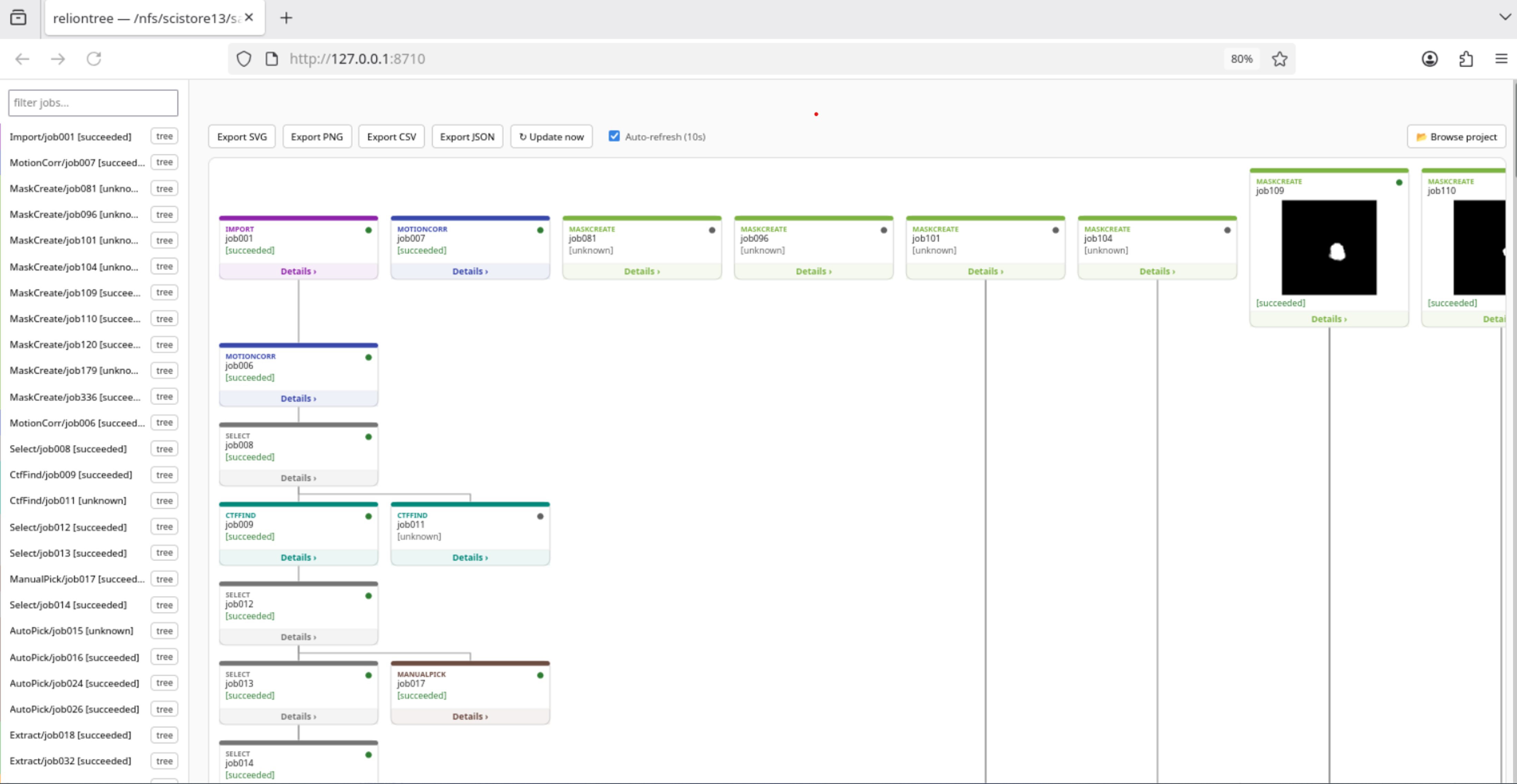
browser: job cards with map/mask thumbnails, a click-to-browse sidebar, and
an in-page directory picker to switch projects. If no project is found at
all, it still starts and lets you browse to one instead of exiting with an
error.
On a machine with no browser available (a cluster login node), use
reliontree tree --format html -o tree.html for the old single-file static
export instead — no server, just a file to scp back or open from a
mounted path.
Commands
tree — job lineage
reliontree tree .                              # ASCII tree in the terminal
reliontree tree . --format json                # machine-readable, for scripts/agents
reliontree tree . --format html -o tree.html   # explicit static HTML file
reliontree tree . --format svg -o tree.svg     # raw SVG only
reliontree tree . --job Class3D/job012         # just that job's upstream lineage
reliontree tree . --job Class3D/job012 --max-hops 3
--format json is the integration point for scripts or AI agents: a
structured graph (jobs, parents, artifacts, stats) instead of text to
parse, with defined exit codes (see below).
table — job history as CSV/Markdown
One row per job: type, state, parent(s), resolution, particle count — for a supplementary table or a quick spreadsheet import.
methods — draft methods-section paragraph
One line per job, assembled from each job's own recorded parameters
(job.star) and outcome (resolution/particle count) — a starting point to
edit, not a citation-ready paragraph.
watch — live-refreshing local view, with options
This is what bare reliontree runs under the hood with its defaults; the
watch subcommand exposes the knobs: --port (default 8710),
--interval (auto-refresh seconds, default 10), --no-open (skip
auto-opening the browser), plus the same --job/--max-hops as tree. A
local server (Python's stdlib http.server, no Flask/Streamlit) rebuilds
the tree on every request; usable on HPC/cloud too via an SSH tunnel.
Exit codes
For use in scripts or CI:
| Code | Meaning |
|---|---|
0 |
ok |
1 |
no RELION project found (no default_pipeline.star in the given/current directory or any parent) |
2 |
parse or job-lookup error (e.g. --job names a job not in the pipeline) |
Using reliontree as a library
Everything the CLI does is also a plain importable function — useful for a notebook, a script, or another tool's pipeline:
import reliontree

project = reliontree.find_project(".")        # or a specific path
tree = reliontree.build_tree(project)
html = reliontree.render_html(tree, title=str(project))

rows = reliontree.history_rows(
    reliontree.ordered_jobs(tree), tree["artifacts"], tree["parents"], tree["stats"],
)
csv_text = reliontree.rows_to_csv(rows)
tree is a plain dict (layers, parents, artifacts, stats, options,
job_dirs) — no custom classes to learn.
How reliontree fits alongside other RELION tools
Follow_Relion_gracefully
and CNIO_Relion_Tools
are Streamlit/Dash apps — a good fit when running a small web server and
reaching it from a browser is easy.
himena-relion is a desktop
GUI, which makes sense when you want a full interactive workstation tool
with a display attached. reliontree targets a narrower situation those
aren't aimed at: an SSH-only cluster login node with no display and often
no spare port to open. Its default view is still live in a browser, just
via Python's own stdlib http.server bound to 127.0.0.1 — nothing to
install, no port beyond your own machine. When even that's not reachable,
reliontree tree --format html -o tree.html falls back to a single static
file instead.
Want to run reliontree watch as its own SLURM job instead of inside a GPU
allocation (it never needs a GPU, and shouldn't tie one up)? contrib/slurm/
in the repo has a minimal, CPU-only sbatch template and the SSH-tunnel
steps to reach it from your laptop.
Cluster provides software via module load instead of pip install?
contrib/modules/ has an Lmod/Tcl modulefile — once an admin sets it up,
module load reliontree puts the exact same reliontree command (all the
same subcommands and options) on PATH.
Origin
The pipeline-parsing and job-tree-diagram logic here started as the Qt/ChimeraX-free core of the ChimeraX-InstantMap plugin's RELION History tab — extracted into its own package since it never needed ChimeraX to begin with. ChimeraX-InstantMap's homepage: github.com/LUKASinScience/ChimeraX-InstantMap.
Contributors
- Lukas W. Bauer (LUKASinScience) — author
- Claude Code (Anthropic) — AI pair-programming assistant, wrote and reviewed a substantial part of this codebase alongside Lukas
- Serhat Dönmez (serhatdonmez98-cmd) — concept, screenshots and demo GIF for the README/docs
License
GNU Affero General Public License v3.0 (AGPL-3.0-or-later).